Quick Guide to Technology Services for Students
- Michele Folsom
- Former user (Deleted)
- Andrew Chaplin
Here's a quick guide to information technology resources available to students at Canisius University
MyCanisius Portal: http://my.canisius.edu
IT Student Preparedness Guide: https://sites.google.com/my.canisius.edu/it-student-preparedness-guide/home
ITS Quick Links: http://www.canisius.edu/its
ResNet: Apogee MyResnet
Reset Password: http://www.canisius.edu/passwordreset
Purchasing a new computer: http://www.canisius.edu/newcomputer
The Basics
If you are a new student, visit the IT Student Preparedness Guide, which will walk you through how to get started with the below resources.
Use the MyCanisius Portal to reach most other Canisius University Web Resources. Start at the Portal each time you access your email, schedules and registration, and course spaces on the web. |
|
Locate your Class Schedule (and Registration Resources) via the MyCanisius Portal, and your Student Profile. Please consider saving our printing resources and use this direct link to obtain access to your schedule: https://banner.canisius.edu/StudentRegistrationSsb/ssb/registrationHistory/registrationHistory. From there you can create a file for upload to your digital calendar, or you can email your schedule. |
|
D2L Here's a basic introduction to D2L. You can find additional D2L tutorials in our Self-Paced Training Set. |
|
ITS Help Desk

For students, information technology help is available in two campus locations. At the library circulation desk, ITS maintains a Help Desk branch where students can get help with various applications such as email, D2L, or printing. The main ITS Help Desk is located in Horan-O'Donnell 016. Services there include password assistance, wireless configuration, and help with applications provided to students by Canisius University.
Although Canisius ITS cannot perform hardware repairs, hard drive re-imaging, data recovery, or backups on student-owned computers, here's a helpful list of local businesses that will perform PC or Mac repairs (for a fee).
Residence Halls: Internet and Cable TV in dorms and campus residences is provided by Apogee. Instructions and support can be accessed on our Residence Hall Internet and Cable TV: Apogee ResNet page. To Contact Apogee for assistance, 24/7:
|
|---|
Reset Your Password
Your username password gives you entry to all your Canisius services. You should not share your password, and you should change it on a regular basis at Password Reset. This will synchronize the password for all your Canisius accounts. If you have a problem, please contact the ITS Help Desk.
Multi-Factor Authentication
Set up Multi-Factor Authentication (MFA) to better protect your Canisius Account. When using an unfamiliar device, you enter a second bit of information to confirm your identity.
On the Web
The MyCanisius Portal: my.canisius.edu
The MyCanisius Portal, available at my.canisius.edu, is a single sign-in destination to find almost all internet resources you need as a student here at Canisius University. After you log into the portal, on the lefthand side of the screen under the Search Apps bar at the top, you'll see links in collapsible menu-trees to your student email (gmail), Desire2Learn, and more.

In order to add links to your Favorites section on myCanisius, please follow the steps below.
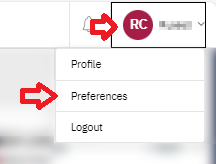
Click on your profile link in the upper right hand corner of the screen. In the drop down menu, click Preferences.
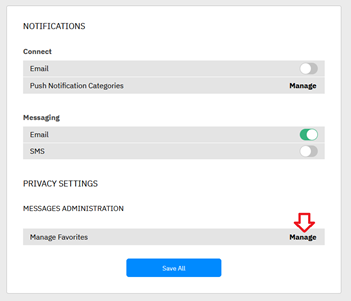
On the next page, click on Manage next to Manage Favorites towards the bottom of the menu.
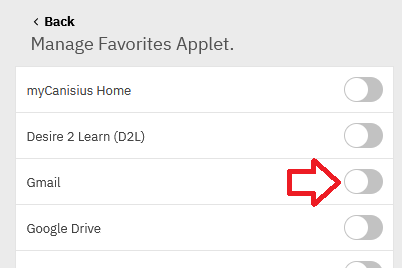
On the next page, you can click toggle buttons to add or remove any links to or from your Favorites section.
After you have finished managing your links, scroll down and click Save All to save your changes.
MyCanisius also will have posted news, events, and deadlines important to students. This includes cancelled classes. Within "My Communities," in the bottom lefthand corner, various offices, departments, centers, and programs maintain web spaces with information for students.
E-mail and Google Apps at Canisius
All students have an email account provided through Google (Gmail), accessed within the lefthand menu of the Portal. Your email address will be your Canisius username, followed by @canisius.edu. (Your can also receive email through username@my.canisius.edu; this is the same email account.)
In addition to email, as a student you have access to enterprise-level Google Apps, with cloud storage on Google Drive, and a variety of specialized sharing options for Google Docs, Sheets, Forms, Presentations, Calendars and so on. You can find tutorial resources here, as well as in many other places on the web, to learn how to use Google Drive, Docs, YouTube, and other Google Apps available to you through your Canisius account.
D2L (Desire2Learn)
D2L is where you find your courses on the web, and is available through the Portal, within the lefthand menu. Here, each class on campus has a space where you can find course materials, submit assignments, and participate in online discussions. On your D2L home page is an orientation video, and links to tutorials.
D2L may also be accessed directly (outside the MyCanisius Portal) via d2l.canisius.edu. You will need to sign in there, however.
Where can I use a campus computer?
For quick internet work, such as checking email or adjusting a Google presentation between classes, Internet Plazas are installed in various places around the main campus. These small groups of computers equipped with web browsers are located in most of the main academic buildings, including the new Science Hall.
For lengthier ("sit-down") work, PC and Mac computers can be found in Bouwhuis Library, lab classrooms, and in many of the on-campus residences (ask your RA for details).
Where can I print on campus?
High speed laser printers are available in hallways and public spaces across campus, including the library. You can print to these any of these public printers from PCs all over campus, and even your own PC. See this quick guide for details.
What technology is available in the Library?
The Bouwhuis Library is at the forefront of providing computer services to the student body here at Canisius University. In addition to computer access, there are many other services that we provide in the library to help make your hectic student life a little bit easier.
PC and Mac computers area available in the Library, conveniently located for coursework or printing. Many are on the main floor of the Library with additional computers on the other levels. Scanners are available at each print station. You will use your username and password to login to all Library computers. You need to save all of your files on either cloud storage or USB drives, as all user files are deleted when a library computer is rebooted.
In addition to the wireless access throughout the library, there are also standard network ports in all of the study rooms and in many other public areas in the library. If you would like to connect your laptop to the campus networks via one of these jacks, you will need to supply your own ethernet cable.
Library hours vary during the year; for example, we keep extended hours at exam time to accommodate extra demand from the student body. For current library hours, Click the "Library" link under My Applications within MyCanisius.
Finally, the library is valuable because University work often requires research, and quality research requires quality sources. Old media, such as books and paper journals, and new media, such as ebooks, online journals, and websites are all valuable resources for student research work. Bouwhius library makes an extensive collection of paper and electronic books and journals available to you on-site and via the web, and can get you books or copies of articles from other places within a few days or weeks. There's so much available through your campus library that it can be a challenge deciding where to begin, but the librarians are happy to help you. If you need help with research, talk to a librarian, stop by the Reference Desk on the entrance level of the library, or give the library a call at x8411.
WiFi Access
Wireless networking is available in all of the academic buildings on campus, including the Bouwhuis Library, Old Main, Lyons Hall and the new Science Hall, as well as in the majority of residence halls.
For information on setting up your own computer or device for wireless network access, please see Wireless Networking at Canisius or stop at the Help Desk.
Where can I get information about internet access in the Residence Halls?
You can learn about Residence Hall internet access, and the contractor who supplies it for Canisius University, /wiki/spaces/ARCHIVEPAGES/pages/19825233. Additionally, your RA can provide you contact information for support.

How do I enroll for classes, track my degree progress, or just see my weekly schedule online?
In the lefthand menus in MyCanisius, you'll see a submenu called "Schedule and Registration." Inside, there's links to various parts of our information system called Banner, that allow you to enroll for classes, and see things like schedules, grades, and run a GriffAudit. See the Student Records and Financial Services (SRFS) Help Center for details.
Online, Hybrid, and Blended Courses
Canisius offers an extensive and growing collection of courses taking place in whole or part online, with limited or no classroom meetings. If you are taking, preparing, or considering an online, blended, or hybrid course, be sure to check out our Readiness for Online Learning site.
Good Information Technology Practices
Create a strong password,, and never give your password to anyone else. ITS will not ask for, and does not need your password. Beware of phishing emails that claim to be from ITS (or something like it) but are in fact scams aiming at getting login information from you, or getting you to download malware to your personal computer.
Backup your files. You should consider any work you do as a student at Canisius University worth saving for future needs. With digital data, that's easy to do. But it should be duplicated in at least three separate locations. This can be, for example, Google Drive, a hard drive in your laptop, and perhaps an external (USB plug) hard drive. After a course is over, you will not have access to its content, including your submitted work, in D2L. So keep your own copies, and keep that data safe!
Canisius University ITS strongly recommends you install, maintain, and use security software on your personal Windows or even Mac PC. Here's some suggestions.
As a student at Canisius, you are eligible to receive discounts on computer software and hardware.
In general, ITS and COLI recommend the Chrome browser for most things you do on the Web, although it's a good idea to have an additional browser on your device as well.
Keep the operating system and important applications on your laptop or mobile device up to date. Web browsers often update along with the operating system, or automatically if you open them. Browser plugins will often prompt you to update. If you use Microsoft Office, you might need to update it yourself.
Other Resources
At the ITS User Services website, you can find links to more tutorials, as well as discounts on computer hardware and software.
Students can download Microsoft Office 365 apps by going to their MS365 account, available through the My Applications menu in the MyCanisius Portal.
Students can borrow cameras, microphones, and other media production equipment from the Canisius Media Center.
Policies
Information Technology Policies
Student Handbook, Related Polices and Procedures